okay, will someone explain to me why there are no (zero) 2-line DECT phones?
I am baffled why there are dozens of 1-line phones, but ansolutely none that meet my needs - of a second phone line. This cannot possibly be an oversight - is there something in the Digital Enhanced Cordless Telecommunications 6.0 standard that says "single line only"?
Showing posts with label wireless. Show all posts
Showing posts with label wireless. Show all posts
Sunday, November 25

Tuesday, October 16
your name will be "Out of Area"
It's taken nearly two years, but I finally found something about my cellphone provider that annoys me. This reply should be self-explanatory:
"Verizon Wireless values your business, and we apologize for the inconvenience of your phone, not displaying your name on the caller ID. I regret to inform you that we do not currently provide the option to personalize the caller ID, for the calls that you place. Currently we only provide the option to display your mobile number and an "unknown, or unavailable caller ID".Still, the alternative could be far worse. I could be one of those blokes with an iPhone, helplessly wedded to AT&T Wireless. Oh, the horror.
Saturday, June 30
the c word (lower case "c")
I went to my ophthalmologist yesterday to find out why my right eye's malfunctioning, and got the news that I have a cataract (early stage). Well, isn't that special? He gave me some drops (Travatan Z) to take each night and we'll decide what to do about this in 30 days. Until then, life's blurry on my right side.
PS: I'm posting this today using a Nokia 770, partly to see how practical it is (early verdict : a regular keyboard is much faster but the autocomplete feature is nice, and it's hard to beat the portability). I've used it to fetch email and do some basic web surfing, but had trouble with the (Pidgin) IM client.
PS: I'm posting this today using a Nokia 770, partly to see how practical it is (early verdict : a regular keyboard is much faster but the autocomplete feature is nice, and it's hard to beat the portability). I've used it to fetch email and do some basic web surfing, but had trouble with the (Pidgin) IM client.
Sunday, March 18
GPS? Jeepers!
Last weekend, Judy-Bob was driving around, showing off her new TomTom. While not without its faults, it wasn't a bad GPS. I was able to figure it out without a manual, which is always a plus, and it didn't make any egregious mistakes as we tested locations.
I suspect that Garmin has the market share lead for portable GPS, but I haven't seen the numbers so this is little more than a SWAG. I haven't chanced across one of their units yet, although I suspect they're all using the same basic technology.
Today I knew that we'd be in need of directions to Janice-Bob, so I decided to give the GPS in my cellphone a whirl. Rather than spend a few hundred dollars for a TomTom or a Garmin, why not try the VZ Navigator [VZN] to see if it would meet my needs (at $3/day or $10/month plus some airtime as explained in the FAQ) especially since all I had to do was download a BREW applet to my phone?
When I tried to search by business name, it found many other locations, but not the one I sought. Is the Achilles' Heel the typical GIGO problem (Garbage In, Garbage Out)? Trying to maintain an updated database of retailers - who come and go as the wind changes - is a difficult task.
At our next stop - a clothing store chain - we found an empty store* (I suspect there was a location of this retailer at one time, but the location had long-since closed). Fortunately, there was another one a few miles away, so by then we'd turned off the VZ Navigator (rapidly sucking the battery) and were locating by sight.
After JB dropped me off, I had an errand of my own to run .. only about 3 miles away. I thought I'd amuse myself and see how well it performed this task .. and the results weren't stellar. First, it had a lot of trouble figuring out my location, having to reorient itself a dozen or more times. I suspect it's trying to use cellphone towers to triangulate my location rather than a GPS satellite (!) so I may have been at the mercy of the cellphone network. It seemed to do okay on the freeways, but bogged down when there were lots of small streets nearby. Pre-trip planning seems to be an appropriate part of using this service.
Part of VZ Navigator involves displaying only a local map, and it did a credible job (given the small screen on my cellphone). The voice prompts were nice, although it'd be nice to shut the speaker off when desired - there's no obvious way).
Also, the [Recent Searches] menu doesn't allow individual entries to be cleared, which is annoying .. mine rapidly piled up with bad locations.
Bottom line: VZ Navigator's handy, but not trustworthy .. I'd grade it a C+/B- overall. I'd rather have access to Yahoo! Maps, which gives step-by-step directions. Yet, VZN downloads maps as needed, so any wrong turns could be corrected quickly. And certainly, in a unfamiliar city, it's more useful than stopping at a gas station every mile to ask directions, fer sher. I'd also compare it favorably to the HertzNeverWorks NeverLost which I last used about 8 years ago, IIRC.
Details, if anyone's interested:
phone: Motorola V325 (software R9.1_X_05.28.09P)
BREW 3.1.2
VZ Navigator 2.8.1 Build 40
* if this has been a trip with Jill Wazabob, finding an empty location would be the expectation, not a surprise.
I suspect that Garmin has the market share lead for portable GPS, but I haven't seen the numbers so this is little more than a SWAG. I haven't chanced across one of their units yet, although I suspect they're all using the same basic technology.
Today I knew that we'd be in need of directions to Janice-Bob, so I decided to give the GPS in my cellphone a whirl. Rather than spend a few hundred dollars for a TomTom or a Garmin, why not try the VZ Navigator [VZN] to see if it would meet my needs (at $3/day or $10/month plus some airtime as explained in the FAQ) especially since all I had to do was download a BREW applet to my phone?
Aside: don't know how much airtime I consumed today (at weekend rates) since Verizon appears to have a 48-hour delay in statistics, when accessed from the phone.The verdict? I got mixed results. VZN found the first place (Poor Richard's Cafe in Plano) without breaking a sweat. Then, I gave it a specific street address (on Preston Road) in Plano and it found a different address in Frisco (inexplicably, a different location of the same automotive service chain). Since the locations were 5+ miles apart, this was less than inspiring.
When I tried to search by business name, it found many other locations, but not the one I sought. Is the Achilles' Heel the typical GIGO problem (Garbage In, Garbage Out)? Trying to maintain an updated database of retailers - who come and go as the wind changes - is a difficult task.
At our next stop - a clothing store chain - we found an empty store* (I suspect there was a location of this retailer at one time, but the location had long-since closed). Fortunately, there was another one a few miles away, so by then we'd turned off the VZ Navigator (rapidly sucking the battery) and were locating by sight.
After JB dropped me off, I had an errand of my own to run .. only about 3 miles away. I thought I'd amuse myself and see how well it performed this task .. and the results weren't stellar. First, it had a lot of trouble figuring out my location, having to reorient itself a dozen or more times. I suspect it's trying to use cellphone towers to triangulate my location rather than a GPS satellite (!) so I may have been at the mercy of the cellphone network. It seemed to do okay on the freeways, but bogged down when there were lots of small streets nearby. Pre-trip planning seems to be an appropriate part of using this service.
Part of VZ Navigator involves displaying only a local map, and it did a credible job (given the small screen on my cellphone). The voice prompts were nice, although it'd be nice to shut the speaker off when desired - there's no obvious way).
Also, the [Recent Searches] menu doesn't allow individual entries to be cleared, which is annoying .. mine rapidly piled up with bad locations.
Bottom line: VZ Navigator's handy, but not trustworthy .. I'd grade it a C+/B- overall. I'd rather have access to Yahoo! Maps, which gives step-by-step directions. Yet, VZN downloads maps as needed, so any wrong turns could be corrected quickly. And certainly, in a unfamiliar city, it's more useful than stopping at a gas station every mile to ask directions, fer sher. I'd also compare it favorably to the Hertz
Details, if anyone's interested:
phone: Motorola V325 (software R9.1_X_05.28.09P)
BREW 3.1.2
VZ Navigator 2.8.1 Build 40
* if this has been a trip with Jill Wazabob, finding an empty location would be the expectation, not a surprise.
Monday, December 25
mulling
I'm wondering if I should get a playmate for my Mac mini. This would replace my oldest PC -- now on the "B" side of a KVM switch.
The Sony (PCV-J150) power supply has been a weak link (in addition to the 512 MB memory limit):
I nosed around the web for a few hours, but can't decide what to do. None of the major players in the PC space (Dell, HP) build what I'm seeking. The closest thing I found Out There is AOpen's MiniPC.
The specs I like on the Mac mini are:
The Sony (PCV-J150) power supply has been a weak link (in addition to the 512 MB memory limit):
1- it gagged when I tried to install a midrange video cardI still (sadly) have to run a few Windows-only apps, so I should also consider a software solution, namely running Parallels Desktop for Mac (speed isn't my primary concern -- the 1.83 GHz Core Duo shouldn't care).
(the Radeon 9250) a few months ago - so I put that adapter in my Sempron instead;
2- the connectors are proprietary, so a motherboard swap isn't possible (the connector won't attach to standard motherboards).
I nosed around the web for a few hours, but can't decide what to do. None of the major players in the PC space (Dell, HP) build what I'm seeking. The closest thing I found Out There is AOpen's MiniPC.
The specs I like on the Mac mini are:
I tend to prefer AMD over Intel, and while I don't need uberGamer-quality graphics, something that'll run stuff like Second Life* without crashing every hour would be nice. That's why running Parallels is not ideal - I'd be limited to the built-in graphics of the Mac mini - an Intel GMA950).SFF (small form factor)
relatively green (+ for fanless)
legacy free (no parallel, PS2 or VGA)
meaning: USB 2.0; Firewire; DVI
multicore (since That's The Trend)
Gig-E (+ for Wireless-G)
*which wants a GeForce 6600; Radeon 9600; or betterI like the mini-ITX form factor, which at 170mm is similar to the Mac mini's 165mm size (adding the system case will make the PC larger). Bottom line: my need isn't immediate, so I'll likely think about it for awhile longer.
Saturday, December 2
the anti-shopping list
I've been spending more time with my Mac (PowerBook-G4) lately, partly due to the convenience offered by its built-in WiFi. One of my long-overdue projects at home has been to slap my DVDs, videotapes and (gasp!) books into a database, and it's much easier schlepping my laptop from room to room, than any of the 3 alternatives:
I expect my ASL to become more handy as I continue to age, and can no longer distinguish between the things I want and the things I already have.
I've been a fan of Instant Messaging for eons, but never liked needing client software for each protocol (AIM, YIM, ICQ, etc.) .. I've used Trillian on my Windows box for years, and now found a Quite Good One for my Mac: Adium. The interface is clean, flexible and works while I'm WiFi'ing my way around the globe. I tried one called [Fire] but it had a nasty habit of locking up, needed a [Force Quit] to return the system to normal. YMMV.
- writing stuff down on paper, then transcribing;
- entering stuff directly into my PDA, which lacks a fullsize keyboard;
- bringing the stuff-to-be-catalogued to the PC, then taking them back
* anti-shopping list [ASL] -- a list of stuff I already own. If something's on that list, it means I shouldn't buy it again.An ASL would've saved me several times over the years, when I spotted something in the store which intrigued me, and I didn't remember if I'd already ordered it online (hence, in transit) or if I'd simply added it to an online Wish List somewhere.
I expect my ASL to become more handy as I continue to age, and can no longer distinguish between the things I want and the things I already have.
I've been a fan of Instant Messaging for eons, but never liked needing client software for each protocol (AIM, YIM, ICQ, etc.) .. I've used Trillian on my Windows box for years, and now found a Quite Good One for my Mac: Adium. The interface is clean, flexible and works while I'm WiFi'ing my way around the globe. I tried one called [Fire] but it had a nasty habit of locking up, needed a [Force Quit] to return the system to normal. YMMV.
Saturday, November 25
By the Time I Get to Phoenix ...
Paula finally headed back to Phoenix on Friday and was "home" 25 hour later, after spending the night in Las Cruces, NM. Now she has to install all the networking toys (wireless-G; gigabit switch; NAS appliance) that she bought while here. It should be easy, but .. (as Roseanne Roseannadanna used to say:) "there's always somethin".
I recall that the approximate distance between Dallas and El Paso (635 miles) is the same as the number of the Interstate highway which loops around Dallas (I-635). Beta's been asking permission to update her blog so I guess she has something to say about the last couple weeks.
I recall that the approximate distance between Dallas and El Paso (635 miles) is the same as the number of the Interstate highway which loops around Dallas (I-635). Beta's been asking permission to update her blog so I guess she has something to say about the last couple weeks.
Wednesday, November 15
176 minutes late

(de-icers at ORD as seen from my seat on AA 2325)
Travel is glamorous.
Travel is glamorous.
Travel is glamorous.
If I repeat that to myself another 436 times, maybe I'll believe it.
The conference at the Q Center (about 45 minutes west of Chicago O'Hare Airport) ended at 10am yesterday, but I didn't get home until after 7pm. Even then, yesterday's travel could've been much worse.
When I boarded the bus, one of my colleagues said that some of the flights to Dallas had been canceled due to the high winds (25-40mph, with 50 mph gusts) .. great. So I quickly called the airline and they confirmed that mine had been canceled, but offered to put me on an earlier flight; I agreed. Once at the airport (after checking in and navigating security) I spotted 3 colleagues and grabbed a bite with them (Chili's Too). Three of us were en route Dallas, and one had to go through Austin* because all the Dallas flights were overbooked.
* Although his flight left Chicago on time, he was still in Austin waiting for a flight to Dallas, after we landed at DFW, nearly 3 hours late.When it came time to board the flight, Brad-Bob and I wandered over to the monitors and saw our flight was now showing a 3-hour delay: splendid. So, we proceeded to try to find a WiFi hotspot and get some work done while we waited.
Although several networks appeared, only the SSID named [concourse] worked for me (banners confirmed that this was "official"). After too many (40?) minutes experimenting, I found a working signal next to gate H4 and was able to access email and a web browser (to keep an eye on my flight status). Maybe I should get a new WiFi detector which shows where the signal's originating. Mine can tell signal strength, but no more (even so, it was better than the guy walking around the K concourse with his laptop, searching for a usable signal). I've seen some detectors that claim to detect open WiFi networks, as well as cameras (which use a signal for their auto-focus).
Boingo AsYouGo is $7 at ORD (and Midway). It's cheaper ($5) at ATL and higher ($8) elsewhere. They also have a monthly plan ("Boingo Monthly Unlimited Subscription") for $22, but I'm not travelling enough to justify that.I suspect the other SSIDs were there just to taunt me. Names like "Free WiFi" and "Public Access" were appealing, but I couldn't make a connection. There were also numerous other SSIDs being broadcast, which appeared to be individual laptops. Oh well .. there will be other flights, and more glamorous travel.
Tuesday, October 31
the butt stops here
Yesterday, I spotted A Texas Idiot throwing a cigarette butt out his window. I guess it was too much trouble to put it in his SUV's ashtray. I made a note of the details, then went online today (Don't Mess with Texas) and reported him. It asked for:
I also heard that you can dial #SMOKE (#76653) from your wireless phone and report a polluting (oil smoke) vehicle. I'll have to add that to my cellphone directory and try it sometime.
- time/date
- location
- license plate
- vehicle make
- what was tossed (cigarette butt/cup-can-bottle/fast food trash/other)
- who tossed it (driver, passenger or truck bed)
"When TxDOT receives the information it is compared to our vehicle registration database and an exact match is located. A letter is mailed to the litterer along with a Don't Mess with Texas litterbag to remind them to put their trash where it belongs!"I'd be happier if TxDOT assigned them to a road crew - 4 hours for the first violation, and an additional 8 hours for every violation after that. Odds are they can't do that, since those who would abuse the system (think: disgruntled teenagers) could make innocent peoples' lives miserable.
I also heard that you can dial #SMOKE (#76653) from your wireless phone and report a polluting (oil smoke) vehicle. I'll have to add that to my cellphone directory and try it sometime.
Sunday, May 7
Watts Up?
Karl was in town for The Derby, and we rendezvoused at Poor Richard's Cafe in Plano. I've heard about this Fine Dining Establishment for several years; Eric (the Redneck) was the first one to Clue Me In. They only seat 260 (so says the sign) so I was amused that there was no waiting for our party of six. And we even scored a jumbo-booth: woo hoo.
After feeding on Ranch Eggs (Huevos Rancheros), I moseyed over to Fry's. And I do mean Mosey in the real connotation. That's often dangerous for me, as I often Shop Like A Guy: go straight for The Thing and then aim straight for The Register. So, I suppose I got off light .. $156 later I strolled out with a 3-pack of air, a replacement spotlight (for locating Beta the Wonder Dog at 3am) and a power meter called a watts up? PRO.
Naturally, once I got the power meter home, I discovered it used an oh-so-quaint DB9 connector, instead of USB. So, it was back to the store for a converter. You'd think by now my Closet Of Horrors would have every adapter known to man, but .. no.
I'm sure I'll blog on this in gory detail Real Soon Now, but playing with the watts up? has already taught me:
1- my reading light uses more watts (100) than my TV (65) and TiVo (11) combined;
2- the old Pentium laptop uses 3 watts while charging; 23 when in use; and 35 when the CPU is maxed out (UD Agent). If I disable the Wireless-G adapter it saves a mere 1.3 watts.
More fascinating observations as I continue playing ...
After feeding on Ranch Eggs (Huevos Rancheros), I moseyed over to Fry's. And I do mean Mosey in the real connotation. That's often dangerous for me, as I often Shop Like A Guy: go straight for The Thing and then aim straight for The Register. So, I suppose I got off light .. $156 later I strolled out with a 3-pack of air, a replacement spotlight (for locating Beta the Wonder Dog at 3am) and a power meter called a watts up? PRO.
Naturally, once I got the power meter home, I discovered it used an oh-so-quaint DB9 connector, instead of USB. So, it was back to the store for a converter. You'd think by now my Closet Of Horrors would have every adapter known to man, but .. no.
I'm sure I'll blog on this in gory detail Real Soon Now, but playing with the watts up? has already taught me:
1- my reading light uses more watts (100) than my TV (65) and TiVo (11) combined;
2- the old Pentium laptop uses 3 watts while charging; 23 when in use; and 35 when the CPU is maxed out (UD Agent). If I disable the Wireless-G adapter it saves a mere 1.3 watts.
More fascinating observations as I continue playing ...
Saturday, April 22
now ain't that phat?
What a way to spend a Saturday. Inside the Dallas Convention Center with 600 people I'd never met before (well, except for Mayor Laura). This was part of Shaping America's Health .. the next seven hours in a surprisingly fast-moving 21st Century Town Meeting® called Shaping America's Youth.
Turns out this is the 2nd one of these ever held. The first was in Memphis, earlier this year. Dallas had over 1046 registrants but only 600 made it to the event. I guess that's a good turnout, especially on one of the 4 nice weekends in Dallas every year (otherwise it's too hot/wet/cold).
The meeting itself was reasonably hi-tech. Each table (10 people) had a Mac iBook connected on a wireless network to a Think Tank near the stage. As we Solved World Hunger, our ideas were passed to this group which cut-and-pasted them into a presentation, offering near-immediate gratification.
The session leaders were David Campt and Julia Sullivan; they did a commendable job staying on their feet the entire time. Many of the attendees (37%) were Hispanic; several accepted the offer of earpieces for a Spanish translation (see also: Avance Dallas). We were handed wireless "voting gadgets" which had a USB interface at the top; the thing was called an "OpinionCounterIQ" (sadly, I didn't think to take a photo of it).
Random stuff:
0- Texas is the 6th fattest state; 63% of Texans are overweight or obese.
1- 35% of school-age children are overweight or obese; only 11% attend PE [Physical Education] classes.
2- David Campt (session leader) said that overweight Americans will die 19 years early, on average.
3- an upcoming TV show is due to be broadcast here on May 27th (channel 11); "The Biggest Generation" will be a good thing to TiVo.
4- Coming soon (April 27th): Bike & Walk to School day. Yeah, like parents will leave their SUVs at home to escort Junior to school. Right.
5- The Cooper Institute has program called "Promoting healthy behaviors in children"
Other speakers:
6- Bradie James (a Dallas Cowboy);
7- Alex Wolens - the mayor's 15-year old daughter;
8- Terry Wade regarding Marathon Kids (Richardson ISD);
9- Dr LeAnn Kridelbaugh, of the Dallas Area Coalition to Prevent Childhood Obesity (probably an offering of Children's Medical Center of Dallas)
Turns out this is the 2nd one of these ever held. The first was in Memphis, earlier this year. Dallas had over 1046 registrants but only 600 made it to the event. I guess that's a good turnout, especially on one of the 4 nice weekends in Dallas every year (otherwise it's too hot/wet/cold).
The meeting itself was reasonably hi-tech. Each table (10 people) had a Mac iBook connected on a wireless network to a Think Tank near the stage. As we Solved World Hunger, our ideas were passed to this group which cut-and-pasted them into a presentation, offering near-immediate gratification.
The session leaders were David Campt and Julia Sullivan; they did a commendable job staying on their feet the entire time. Many of the attendees (37%) were Hispanic; several accepted the offer of earpieces for a Spanish translation (see also: Avance Dallas). We were handed wireless "voting gadgets" which had a USB interface at the top; the thing was called an "OpinionCounterIQ" (sadly, I didn't think to take a photo of it).
Random stuff:
0- Texas is the 6th fattest state; 63% of Texans are overweight or obese.
1- 35% of school-age children are overweight or obese; only 11% attend PE [Physical Education] classes.
2- David Campt (session leader) said that overweight Americans will die 19 years early, on average.
3- an upcoming TV show is due to be broadcast here on May 27th (channel 11); "The Biggest Generation" will be a good thing to TiVo.
4- Coming soon (April 27th): Bike & Walk to School day. Yeah, like parents will leave their SUVs at home to escort Junior to school. Right.
5- The Cooper Institute has program called "Promoting healthy behaviors in children"
Other speakers:
6- Bradie James (a Dallas Cowboy);
7- Alex Wolens - the mayor's 15-year old daughter;
8- Terry Wade regarding Marathon Kids (Richardson ISD);
9- Dr LeAnn Kridelbaugh, of the Dallas Area Coalition to Prevent Childhood Obesity (probably an offering of Children's Medical Center of Dallas)
Monday, March 13
de-stressing : distressing!
I was a few days late in reading my RSS feeds, so I didn't Get The Memo that Geoff had been RIF'd after 20+ years with his employer. Ouch! After such a long stint, he may have difficulty adapting. Looking back on my own episode (May 2004) I understand why some people have heart attacks and die soon after retiring: the change in daily pattern ("de-stressing"?) is too severe. Me, I enjoyed my Extended Vacation, but I lacked many pressures that others face.
One of the things I'd forgotten was the excruciating joy involved in porting my phone number to a personal plan. This is all doc'd on blog entries from that era. This time (last week) it wasn't nearly as bad, although I was carrying two phones for several days (the old one for incoming calls, and the new one for outgoing). After about 3 days -- this time -- the port is complate and the world has returning to it's melodic state of euphoria.
I got two curious text messages that are worth mentioning; the first was from my old carrier:
The second TM was the one from my new carrier, advising that the LNP is complete:
Also (curiously) I tried to Forward the Verizon TM to email, but it will only let me forward a TM to another cellphone: weird.
One of the things I'd forgotten was the excruciating joy involved in porting my phone number to a personal plan. This is all doc'd on blog entries from that era. This time (last week) it wasn't nearly as bad, although I was carrying two phones for several days (the old one for incoming calls, and the new one for outgoing). After about 3 days -- this time -- the port is complate and the world has returning to it's melodic state of euphoria.
I got two curious text messages that are worth mentioning; the first was from my old carrier:
5 cent txt messaging to send & receive starts on or after 6/18/06. Even cheaper text messaging buckets coming in June too! Current rates remain until then. Received: 4:56PM 03/07Not being a believer in Conspiracy Theory, I'm sure it was just a coincidence that this arrived moments after they were informed that I was moving to another carrier.
The second TM was the one from my new carrier, advising that the LNP is complete:
Welcome to Verizon Wireless. You can now make and receive calls on America's Best, Most Reliable Wireless Network. See vzw.com for network details. Fri, Mar 10, 8:17pmWhat's amusing to me is that both carriers "announced" the success of the number porting via Text Message and not Voicemail.
Also (curiously) I tried to Forward the Verizon TM to email, but it will only let me forward a TM to another cellphone: weird.
Saturday, March 11
laptop: back from the dead
I have possession of an old laptop: a Fujitsu E6530. It's an Intel Pentium III 500 MHz -- a real museum piece. A few weeks ago, a co-worker needed to borrow it while hers was in the shop, and I felt bad about the condition of the OS; I decided to freshen this box when she returned it. The copy of Win98SE has been in use for many years and is highly suspect.
The maximum RAM on a a Fujitsu E6530 is 256 MB; Settings/Control Panel/System confirmed that 192 MB is installed. The disc capacity is 8.41 GB. I tried to install Linux on it once, and there wasn't enough RAM/disc (although some versions may fit, the one I used did not).
1. Press F12 and boot from the Recovery CD. This places a fresh copy (as of the time that CD was created) of Windows 98SE on the laptop. Reboot (#1) and continue.
2. Add a Wireless-G card (ConnectGear's WE340G has Win98SE support). It installed easily, works great. Reboot #2
3. Attempt Windows Update. Start Internet Explorer [MS-IE] v5 and select Tools/Windows Update. When I try "Scan for updates" I get an error, and a popup asks if I'd like to email that info to Microsoft. Sure, why not? I configure Outlook Express (v5) and email the error. Meanwhile (I don't really expect them to answer) I decided to try another tactic: update MS-IE and see if the new version will allow Windows Update to start.
4. Update to MS-IE v6. This includes several new versions of the Win98SE applications. Reboot #3
5. Windows Update now works! There are 21 "Critical Updates and Service Packs" and 44 Recommended Updates. The 18 MB of Critical Updates takes 3 minutes to download. Reboot #4
6. There's a new "Connect to the Internet" icon on the desktop; since Internet access was already working, I ignore it. I've gotten into the habit of creating a text document called "ChangeControl" on the desktop, to record what software/hardware I load. Pressing [F5] in a Notepad window gives the time. The format's simple:
8. Load MS-IE 6. I'm tiring of seeing the Microsoft Network home page. Tools/Windows Update/Scan for Recommended Updates (43 remain in the "Windows 98 and Windows 98 Second Edition" category). I quickly scan for any more * (indicating "must be installed separately" or "installation may include additional items (prerequisites)". Many of them (34) are in the "Multi-Language Features" section and provide support for Arabic; Chinese; Czech; Danish; Dutch; Finnish; French; German; Greek; Hebrew; Hungarian; Italian; Japanese; Korean; Norwegian; Pan-European; Polish; Portuguese; Russian; Spanish; Swedish; Thai; Turkish and Vietnamese. It appears that 9 Recommended Updates need to be installed, and only one ("Windows Media Player 9 Series") wants to be installed separately: 13.3 MB and less than a minute to download. No reboot!
9. In the Windows Update page on microsoft.com a new "Critical Updates and Service Packs" item has appeared: "Security Update for DirectX (KB904706)". I install that separately (no reboot) and then install another 6 Recommended Updates totaling 24.5 MB (3 minute download). Curiously, "Download time remaining" has stopped updating, but the download proceeds, followed by lots of disc I/O as they are installed. Reboot #6
10. 36 Recommended Updates remain, but 3 additional "Critical Updates and Service Packs" items have appeared: "Security Update for Windows Media Player 9 for Windows 98 and Windows ME"; "Microsoft GDI+ Detection Tool" and "Microsoft .NET Framework 1.1 Service Pack 1". None have asterisks. Total: 3 = 12.3 MB, 1 minute. Installation failed, so I try installing them one by one, but that also failed. I'll try installing the 2 remaining "Recommended Updates" (Euro Conversion Tool and "Mapped Drives Shutdown Update*") .. that worked, but then prompted for Reboot #7
11. Those 3 additional "Critical Updates and Service Packs" items remain. Windows Update downloads them, then a popup appears: "Microsoft GDI+ Detection Tool" asks if I'd like to "learn more about a security vulnerability". Sure .. why not? It takes me to "How to update your computer with the JPEG processing (GDI+) security update" page. While I'm reading that, another popup says that another reboot is needed. I decided to [Cancel] that and read the GDI+ suggestions, which scanned the disc for software that needs updating ("Check for affected imaging software"). Recall that this is an out-of-the-box installation of fresh software. The tool failed with the message "We are sorry, but the tool did not work properly on your computer. Please try again later." I bookmark that page, if I ever hope to find it again. Reboot #8
12. A new icon appears on the desktop: "Windows Media Player" (never mind that there's another one in the taskbar). There are duplicates of the Internet Explorer and Outlook Express icons already. Icon proliferation is one of the greatest problems of the modern world. Now, Windows Update shows no Critical Updates, and there are no Recommended Updates! Only the GDI+ issue is unresolved. I scan again, and it fails again. Well, at least I gave it The Old College Try.
13. Some things are not available with Windows 98SE, including anti-virus and anti-spyware. I install Spybot Search & Destroy 1.4 for anti-spyware and AVG Anti-Virus Free Edition 7.1.375. The anti-virus software installation meant that a restart is needed. Reboot #9
14 The OSpatching (oops .. Microsoft never uses "the P word") Updating took about 2 hours. Final touch: update the "ChangeControl" document so I'll know what was done.
I guess I should run Start/Programs/Accessories/System Tools/Disk Defragmenter before putting it to bed for the night. Total disc used: 1.26 GB with 7.13 GB free. Woo hoo.
Tomorrow, I'll install StarOffice 8; Adobe Reader 6.0.1 (the latest for Win98SE); Atomic Clock Sync; Mozilla Firefox/Thunderbird and whatever else I need to make this laptop productive.
The maximum RAM on a a Fujitsu E6530 is 256 MB; Settings/Control Panel/System confirmed that 192 MB is installed. The disc capacity is 8.41 GB. I tried to install Linux on it once, and there wasn't enough RAM/disc (although some versions may fit, the one I used did not).
1. Press F12 and boot from the Recovery CD. This places a fresh copy (as of the time that CD was created) of Windows 98SE on the laptop. Reboot (#1) and continue.
2. Add a Wireless-G card (ConnectGear's WE340G has Win98SE support). It installed easily, works great. Reboot #2
3. Attempt Windows Update. Start Internet Explorer [MS-IE] v5 and select Tools/Windows Update. When I try "Scan for updates" I get an error, and a popup asks if I'd like to email that info to Microsoft. Sure, why not? I configure Outlook Express (v5) and email the error. Meanwhile (I don't really expect them to answer) I decided to try another tactic: update MS-IE and see if the new version will allow Windows Update to start.
4. Update to MS-IE v6. This includes several new versions of the Win98SE applications. Reboot #3
5. Windows Update now works! There are 21 "Critical Updates and Service Packs" and 44 Recommended Updates. The 18 MB of Critical Updates takes 3 minutes to download. Reboot #4
6. There's a new "Connect to the Internet" icon on the desktop; since Internet access was already working, I ignore it. I've gotten into the habit of creating a text document called "ChangeControl" on the desktop, to record what software/hardware I load. Pressing [F5] in a Notepad window gives the time. The format's simple:
2:42 PM 3/11/06 updated MS-IE to 6.0.2800.11067. Start MS-IE 6 and do Tools/Windows Update to inspect the 44 Recommended Updates. The first is "DirectX 9.0c End-User Runtime*" where the * indicates "Must be installed separately from other updates". After a 90-second download, reboot #5
updated Outlook Express to 6.0.2800.1106
etc.
8. Load MS-IE 6. I'm tiring of seeing the Microsoft Network home page. Tools/Windows Update/Scan for Recommended Updates (43 remain in the "Windows 98 and Windows 98 Second Edition" category). I quickly scan for any more * (indicating "must be installed separately" or "installation may include additional items (prerequisites)". Many of them (34) are in the "Multi-Language Features" section and provide support for Arabic; Chinese; Czech; Danish; Dutch; Finnish; French; German; Greek; Hebrew; Hungarian; Italian; Japanese; Korean; Norwegian; Pan-European; Polish; Portuguese; Russian; Spanish; Swedish; Thai; Turkish and Vietnamese. It appears that 9 Recommended Updates need to be installed, and only one ("Windows Media Player 9 Series") wants to be installed separately: 13.3 MB and less than a minute to download. No reboot!
9. In the Windows Update page on microsoft.com a new "Critical Updates and Service Packs" item has appeared: "Security Update for DirectX (KB904706)". I install that separately (no reboot) and then install another 6 Recommended Updates totaling 24.5 MB (3 minute download). Curiously, "Download time remaining" has stopped updating, but the download proceeds, followed by lots of disc I/O as they are installed. Reboot #6
10. 36 Recommended Updates remain, but 3 additional "Critical Updates and Service Packs" items have appeared: "Security Update for Windows Media Player 9 for Windows 98 and Windows ME"; "Microsoft GDI+ Detection Tool" and "Microsoft .NET Framework 1.1 Service Pack 1". None have asterisks. Total: 3 = 12.3 MB, 1 minute. Installation failed, so I try installing them one by one, but that also failed. I'll try installing the 2 remaining "Recommended Updates" (Euro Conversion Tool and "Mapped Drives Shutdown Update*") .. that worked, but then prompted for Reboot #7
11. Those 3 additional "Critical Updates and Service Packs" items remain. Windows Update downloads them, then a popup appears: "Microsoft GDI+ Detection Tool" asks if I'd like to "learn more about a security vulnerability". Sure .. why not? It takes me to "How to update your computer with the JPEG processing (GDI+) security update" page. While I'm reading that, another popup says that another reboot is needed. I decided to [Cancel] that and read the GDI+ suggestions, which scanned the disc for software that needs updating ("Check for affected imaging software"). Recall that this is an out-of-the-box installation of fresh software. The tool failed with the message "We are sorry, but the tool did not work properly on your computer. Please try again later." I bookmark that page, if I ever hope to find it again. Reboot #8
12. A new icon appears on the desktop: "Windows Media Player" (never mind that there's another one in the taskbar). There are duplicates of the Internet Explorer and Outlook Express icons already. Icon proliferation is one of the greatest problems of the modern world. Now, Windows Update shows no Critical Updates, and there are no Recommended Updates! Only the GDI+ issue is unresolved. I scan again, and it fails again. Well, at least I gave it The Old College Try.
13. Some things are not available with Windows 98SE, including anti-virus and anti-spyware. I install Spybot Search & Destroy 1.4 for anti-spyware and AVG Anti-Virus Free Edition 7.1.375. The anti-virus software installation meant that a restart is needed. Reboot #9
14 The OS
I guess I should run Start/Programs/Accessories/System Tools/Disk Defragmenter before putting it to bed for the night. Total disc used: 1.26 GB with 7.13 GB free. Woo hoo.
Tomorrow, I'll install StarOffice 8; Adobe Reader 6.0.1 (the latest for Win98SE); Atomic Clock Sync; Mozilla Firefox/Thunderbird and whatever else I need to make this laptop productive.
memories of Amber ...
I wonder if I'll ever look back on this day, and find myself missing Amber?
Amber was the automated voice I'd talk to when I called Virgin Mobile for support. She and I developed a bond over the past 20 months or so, when I began using their prepaid service. I'll miss Topping Up (buying more minutes). I'll miss my ringtong ("Itchycoo Park" by The Small Faces).
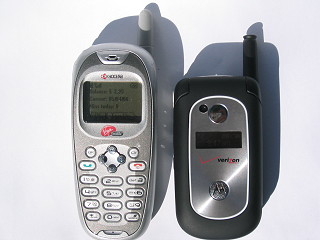
When it's closed, the Motorola V325 is a bit smaller than the Kyocera KE433 (Rave 7), but the time is always visible, so that's a plus. Why bother carrying a watch?
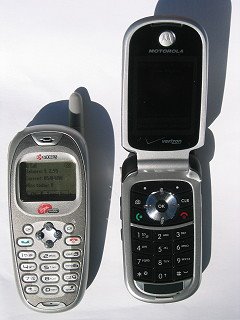
However, it's a clamshell design, so when it's open, the Motorola's larger. The connector is the same mini-USB that the Razr uses, so potentially there's a way to backup the V325's Address Book (unlike the Kyocera). It's also color, and yes .. it has a camera and a speakerphone and other toys the Kyocera lacked. I tried to find my former ringtone, but Verizon Wireless never heard of The Small Faces, or even Alpha Blondy for that matter. I guess I'll have to find another obscure ringtone to differentiate my ring from everyone else in the room.
The thing I may miss most about my old friend? The Flashlight:

Amber was the automated voice I'd talk to when I called Virgin Mobile for support. She and I developed a bond over the past 20 months or so, when I began using their prepaid service. I'll miss Topping Up (buying more minutes). I'll miss my ringtong ("Itchycoo Park" by The Small Faces).
When it's closed, the Motorola V325 is a bit smaller than the Kyocera KE433 (Rave 7), but the time is always visible, so that's a plus. Why bother carrying a watch?
However, it's a clamshell design, so when it's open, the Motorola's larger. The connector is the same mini-USB that the Razr uses, so potentially there's a way to backup the V325's Address Book (unlike the Kyocera). It's also color, and yes .. it has a camera and a speakerphone and other toys the Kyocera lacked. I tried to find my former ringtone, but Verizon Wireless never heard of The Small Faces, or even Alpha Blondy for that matter. I guess I'll have to find another obscure ringtone to differentiate my ring from everyone else in the room.
The thing I may miss most about my old friend? The Flashlight:
Tuesday, February 28
low man on the totem pole
The DFW-SJC flight last night was mostly uneventful. It's the first time I've flown on business in about 2 years; at one time I was spending a week in California every month, so yes .. this is a novelty, although I did "practice" a trip to the same DFW Terminal D earlier in the day (to fetch Jill-Bob).
Most of American's flights on this route are MD-88s, which have about 30 rows of 5-across seating, and I heard the Flight Attendants [FA] saying that nearly every flight except Saturdays are full lately. This was no exception. I don't know if anyone was denied boarding (I wasn't in the gate area long enough to hear them say it was oversold, looking for volunteers for the next flight). Once we pushed back from the gate, the FA instructed us to turn off "anything with an on/off switch" which was better than the long list of stuff they used to read .. while I hoped they missed one/more of my omnipresent gadgets.
The worst thing about the Travel Gap is that I'm back to "Square One" in the Frequent-This and Frequent-That programs (airline, car rental, hotel, parking). This means I now must sit in the back of the bus (seat 28F on the outbound and 26F on the return) with the rest of the rifraff, and can't even qualify to use the upgrades I bought years ago, until I reach a minimum of Aadvantage Gold (unlikely anytime soon).
Some good things have happened since I last flew frequently: American Airlines' Rapid Check-In machines are a welcome departure from dealing with a Human ticket agent (which seldom speaks English). The machine which scans boarding passes at the gate have finally become fast (I used to groan whenever a flight was assigned The Boarding Pass Machine .. meaning the boarding would take twice as long as those conducted by Humans).
First, there was the obligatory TSA scan (metal detection; X-ray of my rucksack, shoes, laptop). Once on the plane, I found myself sitting next to a female "terrorist" - the only woman on the plane wearing an hijab. I was prepared to stab her with my plastic butter knife if she made any wrong moves. I must get some better noise cancelling headphones .. the earbuds I have from Turtle Beach are effective, but didn't shut out the nearby malevolent Demon Child shreiking for an extended duration at a pitch slightly less annoying than fingernails on a chalkboard.
Due to the (HR-induced) delays in marking me as an Active employee, I didn't get in an early queue for hotels in TBA* so I ended up at a $60/night Zero Service Hotel .. no daily maid, no room service, no onsite dining (I defy you to find anything open other than Denny's after 10pm in TBA!) and .. (gasp!) .. no Ethernet (just a quaint analog modem plug). They did offer wireless networking for $4/stay, and the hotel had indoor plumbing. I avoided the room's phone: 75¢/minute for long distance (and $2.78/minute for international calls .. after the first $14.62 minute) struck me as an absurd ripoff. The Ford Fusion rental car -- in the rain -- wasn't awful .. it's just not like JAC (Just Another Car) here at home.
Most of American's flights on this route are MD-88s, which have about 30 rows of 5-across seating, and I heard the Flight Attendants [FA] saying that nearly every flight except Saturdays are full lately. This was no exception. I don't know if anyone was denied boarding (I wasn't in the gate area long enough to hear them say it was oversold, looking for volunteers for the next flight). Once we pushed back from the gate, the FA instructed us to turn off "anything with an on/off switch" which was better than the long list of stuff they used to read .. while I hoped they missed one/more of my omnipresent gadgets.
The worst thing about the Travel Gap is that I'm back to "Square One" in the Frequent-This and Frequent-That programs (airline, car rental, hotel, parking). This means I now must sit in the back of the bus (seat 28F on the outbound and 26F on the return) with the rest of the rifraff, and can't even qualify to use the upgrades I bought years ago, until I reach a minimum of Aadvantage Gold (unlikely anytime soon).
Some good things have happened since I last flew frequently: American Airlines' Rapid Check-In machines are a welcome departure from dealing with a Human ticket agent (which seldom speaks English). The machine which scans boarding passes at the gate have finally become fast (I used to groan whenever a flight was assigned The Boarding Pass Machine .. meaning the boarding would take twice as long as those conducted by Humans).
First, there was the obligatory TSA scan (metal detection; X-ray of my rucksack, shoes, laptop). Once on the plane, I found myself sitting next to a female "terrorist" - the only woman on the plane wearing an hijab. I was prepared to stab her with my plastic butter knife if she made any wrong moves. I must get some better noise cancelling headphones .. the earbuds I have from Turtle Beach are effective, but didn't shut out the nearby malevolent Demon Child shreiking for an extended duration at a pitch slightly less annoying than fingernails on a chalkboard.
Due to the (HR-induced) delays in marking me as an Active employee, I didn't get in an early queue for hotels in TBA* so I ended up at a $60/night Zero Service Hotel .. no daily maid, no room service, no onsite dining (I defy you to find anything open other than Denny's after 10pm in TBA!) and .. (gasp!) .. no Ethernet (just a quaint analog modem plug). They did offer wireless networking for $4/stay, and the hotel had indoor plumbing. I avoided the room's phone: 75¢/minute for long distance (and $2.78/minute for international calls .. after the first $14.62 minute) struck me as an absurd ripoff. The Ford Fusion rental car -- in the rain -- wasn't awful .. it's just not like JAC (Just Another Car) here at home.
* The Bay Area
Wednesday, February 22
you want fries with that?
Everytime I get a new PC*, I end up buying a few hundred dollars of peripherals to make it work gooder [sic]. This time, those goodies included some wireless-G (802.11G) stuff; a gigabit switch (replaces a 10 Mb hub that was manufactured when Teddy Roosevelt was President); and a Bluetooth mouse (for my PowerBook).
Also, I continue to be impressed/amused with Buy.com .. I ordered one of the wireless components through them, then opted for "FREE Budget Shipping" instead of Standard. The stuff arrived the next day (good thing I didn't pay extra for Next Day Delivery). To be fair, it shipped from Carrollton, Texas which is an easy drive from my home, so UPS didn't have to work too hard to pull that off.
* defined very loosely .. includes everything from a Palm PDA to an Apple PowerBook. I figure that if it done got a CPU, it kin be kalt a PC.If computer manufacturers were smart (and I now put Apple to the top of that list after my recent positive experience) they'd include incentives to buy more of their peripherals, soon after the PC purchase. Maybe they do, and I simply haven't noticed (which is as good as not doing it). Then again, sometimes a 3rd party peripheral is best (example: the Rhino case I selected for my PDA, after the Palm-branded one proved to be terribly inferior).
Also, I continue to be impressed/amused with Buy.com .. I ordered one of the wireless components through them, then opted for "FREE Budget Shipping" instead of Standard. The stuff arrived the next day (good thing I didn't pay extra for Next Day Delivery). To be fair, it shipped from Carrollton, Texas which is an easy drive from my home, so UPS didn't have to work too hard to pull that off.
Monday, February 20
a new addition to the family
Well, this was easy. I'm entering this blog posting from my new PowerBook G4 which arrived either 7 or 3 days early, depending on which shipping story you believe. I ordered it on my 2nd day back at work, long before my badge or LDAP entry was up. The setup was trivial; it didn't even ask for my timezone yet seemed to figure it out without any problem. Ditto for the Maxtor Shared Storage box, which is my home (300 GB) fileserver .. it found the CIFS/SMB workgroup and all I had to do was login. Windows XP itself should be this easy.
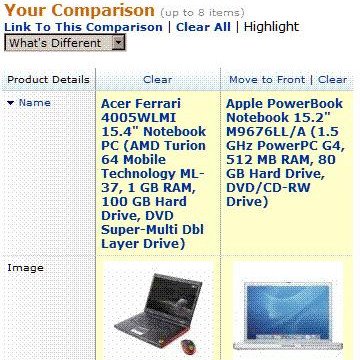
Photo: two currently popular laptops:
Apple's PowerBook G4 and Acer's Ferrari 4005
The Blogger interface is missing a few buttons but I'll probably figure that out in a day or so. I have a few networking issues to settle here at home, including upgrading my Ethernet hub from a 10 Mb variety to something of this century, and slapping a Wireless-G network atop my ADSL circuit. That can wait a few days, while I learn more about Mac OS X.
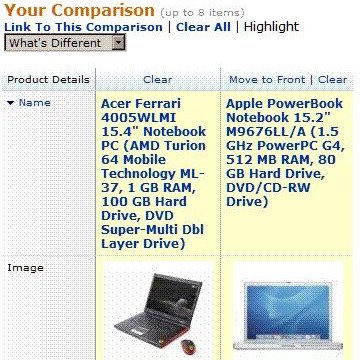
Photo: two currently popular laptops:
Apple's PowerBook G4 and Acer's Ferrari 4005
The Blogger interface is missing a few buttons but I'll probably figure that out in a day or so. I have a few networking issues to settle here at home, including upgrading my Ethernet hub from a 10 Mb variety to something of this century, and slapping a Wireless-G network atop my ADSL circuit. That can wait a few days, while I learn more about Mac OS X.
Thursday, February 16
Thursday: short sleeves. Friday: parka?
As DMN columnist Alan Melson opined:
Unrelated: I went back to work Monday, after "a few weeks off" .. but haven't been able to do much because I'm not yet In The System. I've been able to gather information on the teams I'll work with, but not much else yet. Maybe by President's Day (the Holiest holiday in the USA).
I was told that I'd need a laptop, so .. throwing caution to the wind .. decided on an Apple PowerBook G4. If shipping schedules can be believed, it'll be in my hands next week. I've never owned a Mac before and I anticipate a steep learning curve. I suppose I should set it up on a wireless-G net here at home? Maybe one of my ever-so-thoughtful neighbors has an unsecured network that I can tap into? Hmm. Decisions, decisions.
"Just 24 hours after temperatures in Dallas-Fort Worth reached the mid-80s, forecasters are expecting a high Friday afternoon of just 39 degrees - and a good chance that freezing precipitation will hit the area as commuters make their way home."Indeed, it's 84F as I publish this entry, but a strong wind started at 17:38 which may signal The Cold Front coming through town. I suppose I should do what all Texans are trained to do when the temp drops below 50F: go to the grocery store and buy anything remaining on the shelves.
Unrelated: I went back to work Monday, after "a few weeks off" .. but haven't been able to do much because I'm not yet In The System. I've been able to gather information on the teams I'll work with, but not much else yet. Maybe by President's Day (the Holiest holiday in the USA).
I was told that I'd need a laptop, so .. throwing caution to the wind .. decided on an Apple PowerBook G4. If shipping schedules can be believed, it'll be in my hands next week. I've never owned a Mac before and I anticipate a steep learning curve. I suppose I should set it up on a wireless-G net here at home? Maybe one of my ever-so-thoughtful neighbors has an unsecured network that I can tap into? Hmm. Decisions, decisions.
Friday, June 18
SMS grows up .. to be a Pink Dot?
My shiny new Kyocera phone includes a GPS [Global Positioning System] feature; I wasn't aware that the phones themselves had to change, for things like E911 to work. Does this mean that older phones can't play in the E911 world? There's a setting where I can disable GPS from my provider's eyes, but not the nice folks at Emergency Services. Hmm. We could have used a GPS to get out of Deep Ellum last night (more on that later).
In the I Didn't Get The Memo category: I'm happy to see that Text Messaging (aka TM, aka SMS - Short Message Service) on cellphones has grown up. In the Old Days (2 years ago?) I had to know which carrier my friend was on, before I could send a TM, and it had to be formatted as number@some-specific-domain.com ... now, I just enter [Send Text] and their cellphone number ... and Magic Happens to route the call to the right network. This may only be on my sophisticated phone; Your Mileage May Vary.
One downside to the Virgin Mobile service is that my two Yahoo! Alerts (weather forecast, and a stock quote) don't work. What's so hard about sending a TM to an email address that I provide? In my case, Virgin Mobile has a well known format: number@vmobl.com .. but Yahoo! Alerts work only under AT&T Wireless; Cingular; Nextel; Sprint; T-Mobile or Verizon. I temporarily disabled those alerts, while Yahoo! gets their act together. This could take years.
The Quest Continues
While at the grocery, I picked up a package of Sun-Maid Sliced Cantaloupe. This is part of my quest to Try Something New every time I grocery shop.
Cosmic Editing
Trish-Bob learned quickly how to instruct others in the use of her shiny new digicam, during our Night On The Town with Jill-Bob:


Savvy blog readers might note the similarity between this photo, and one on Trish-Bob's blog. It's as if Gene-Bob never existed! The photo was taken by one of the roving staffmembers at the Gypsy Tea Room, where the Legendary Pink Dots performed to astoned out sold out diverse audience. We had a good time, and really enjoyed the ERET [Extended Real Estate Tour] after the concert. Thanks, TB!
Also, before I forget ... the (admittedly low-tech) flashlight built into my new cellphone came in handy last night, as I tried to find the keyslot for my front door. Guffaw if you must, but I predict that future that all future mobile phones will include GPS chips, flashlights and perhaps even (hold onto your hats) digital cameras. Yeah, I know .. I'm quite the futurist.
GoogL'ost: GenCorp
In the I Didn't Get The Memo category: I'm happy to see that Text Messaging (aka TM, aka SMS - Short Message Service) on cellphones has grown up. In the Old Days (2 years ago?) I had to know which carrier my friend was on, before I could send a TM, and it had to be formatted as number@some-specific-domain.com ... now, I just enter [Send Text] and their cellphone number ... and Magic Happens to route the call to the right network. This may only be on my sophisticated phone; Your Mileage May Vary.
One downside to the Virgin Mobile service is that my two Yahoo! Alerts (weather forecast, and a stock quote) don't work. What's so hard about sending a TM to an email address that I provide? In my case, Virgin Mobile has a well known format: number@vmobl.com .. but Yahoo! Alerts work only under AT&T Wireless; Cingular; Nextel; Sprint; T-Mobile or Verizon. I temporarily disabled those alerts, while Yahoo! gets their act together. This could take years.
The Quest Continues
While at the grocery, I picked up a package of Sun-Maid Sliced Cantaloupe. This is part of my quest to Try Something New every time I grocery shop.
Cosmic Editing
Trish-Bob learned quickly how to instruct others in the use of her shiny new digicam, during our Night On The Town with Jill-Bob:

Savvy blog readers might note the similarity between this photo, and one on Trish-Bob's blog. It's as if Gene-Bob never existed! The photo was taken by one of the roving staffmembers at the Gypsy Tea Room, where the Legendary Pink Dots performed to a
Also, before I forget ... the (admittedly low-tech) flashlight built into my new cellphone came in handy last night, as I tried to find the keyslot for my front door. Guffaw if you must, but I predict that future that all future mobile phones will include GPS chips, flashlights and perhaps even (hold onto your hats) digital cameras. Yeah, I know .. I'm quite the futurist.
GoogL'ost: GenCorp
Thursday, June 3
oh, waiter ...
The Kyocera K-7 Rave (cellphone) doesn't have an external connector (other than power) so I had to manually enter the stuff from my Nokia 6360's address book: what a pain. The good news is that I could eliminate most of the numbers, since they were internal 5-digit extensions, which I won't be calling anymore. AT&T Wireless' "Office Dialing" feature was the only reason I kept them as a provider (and now they're being bought by Cingular Wireless).
The FCC apparently would like the porting of phone numbers to take 2.5 hours, but Virgin Mobile predicted 3-5 business days. When the switch happens, the old phone will stop working (except for 911 of course) and the new one will start, signalled by a "Welcome to Virgin Mobile" message. So now I wait, and carry both phones with me. At least now the carriers have some practice, unlike last November (see Porting your cell number).
The FCC apparently would like the porting of phone numbers to take 2.5 hours, but Virgin Mobile predicted 3-5 business days. When the switch happens, the old phone will stop working (except for 911 of course) and the new one will start, signalled by a "Welcome to Virgin Mobile" message. So now I wait, and carry both phones with me. At least now the carriers have some practice, unlike last November (see Porting your cell number).
Subscribe to:
Posts (Atom)